
How to Use ChatGPT for LinkedIn Posts: Your Ultimate Guide to AI-Powered Content that Converts

sushakanaujia
Author
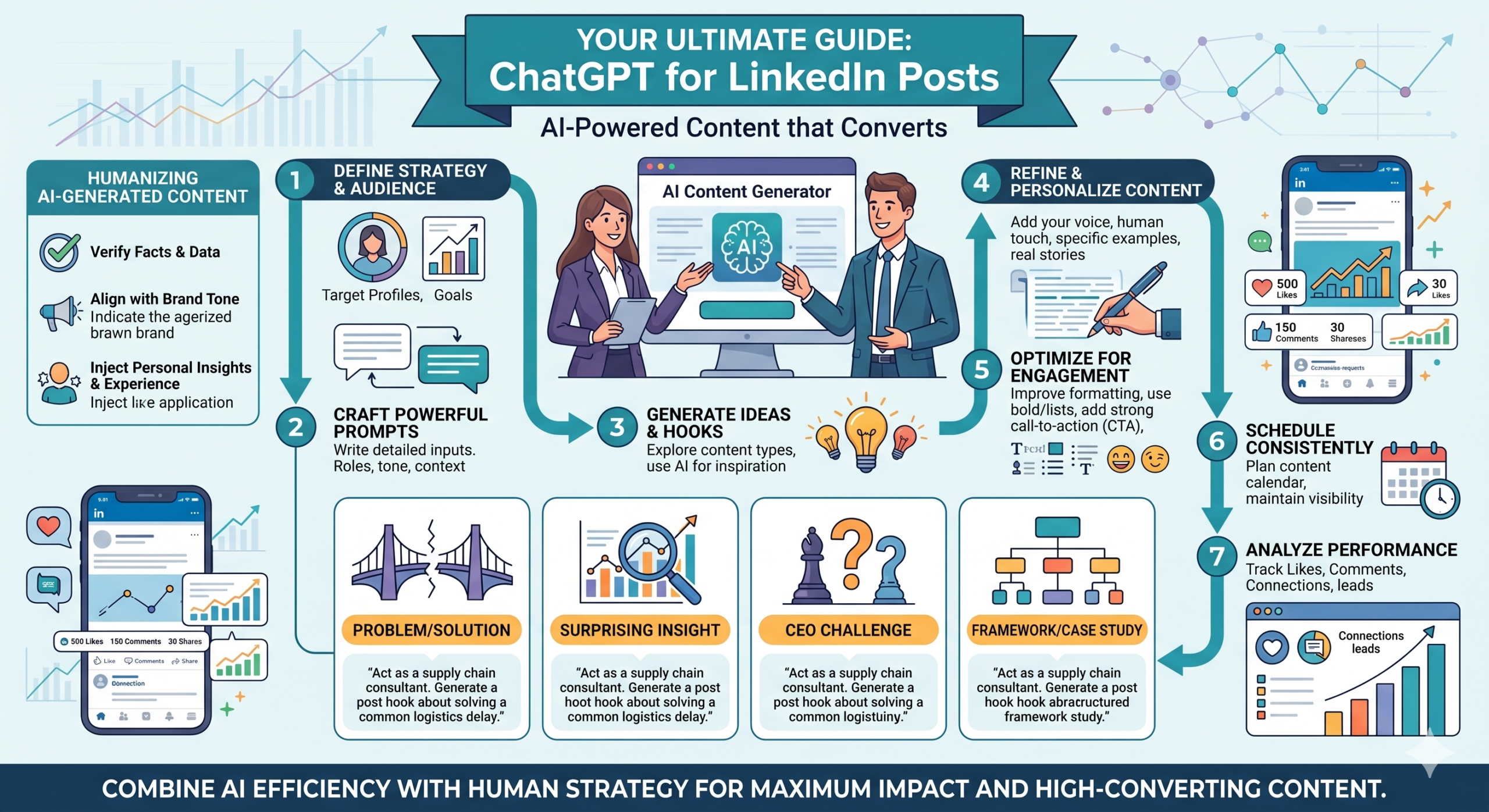
Look, if you’re still hand-crafting every single LinkedIn post, spending hours staring at a blank screen, you’re missing out. Big time. This isn’t just about saving a few minutes here and there; this is about leveling up your entire LinkedIn game. We’re talking about a content workflow that’s faster, smarter, and way more impactful—all thanks to integrating AI, specifically ChatGPT, the right way. Because let’s be honest, generic AI content? Yeah, that just looks lazy. But strategic AI integration? That’s your secret weapon.
The Strategic Advantage: Why Use ChatGPT for Your LinkedIn Presence?
So, why bother? Is it just hype, or is there real meat on this AI-powered content bone? Here’s the deal: businesses that are actually smart about using AI for content creation aren’t just cutting costs. Nope. They’re seeing engagement skyrocket and reaching bigger audiences. Recent studies? They’re screaming. The Economist, for instance (yeah, Forbes loved it too), pointed out that companies using AI for content can slash costs by up to 40% and pump out content 3-5x faster. But here’s where it gets juicy: when humans get in there and refine that AI output? Click-through rates on those posts can jump another 12-18%. That’s because it marries AI’s efficiency with human nuance. It’s a literal no-brainer.
Overcoming Content Creation Bottlenecks and Writer’s Block
Staring at a blinking cursor is soul-crushing. Seriously, it drains creative energy faster than a Monday morning meeting. ChatGPT just wipes that problem away. It’s an instant thought partner, spitting out ideas, angles, and full drafts in seconds.
- Practical Execution Step: Think of it like this: set up a weekly “AI Ideation Sprint.” Your marketing team (or just you!) can fire prompts at ChatGPT to brainstorm 50+ content ideas for your LinkedIn presence in less than an hour. Then, you just filter and pick the best 5-10 to develop. This cuts your initial ideation phase from hours to minutes. Legit, it’s a game-changer.
Boosting Consistency and Content Velocity
LinkedIn’s algorithm? It loves consistency. Companies that post daily, for example, can grow their audience almost 4x faster than those posting weekly. Trying to keep up that pace manually? Impossible without burning out your team or sacrificing quality. With ChatGPT assisting you to write LinkedIn posts with AI, you can keep that high cadence without sweating it. You’re constantly relevant, always top-of-mind.
Boosting Engagement and Expanding Reach
When your content is consistent and targeted, LinkedIn’s algorithm notices. It pushes your posts to more people. ChatGPT lets you experiment with different angles, hooks, and calls to action faster, helping you zero in on what truly resonates with your audience. This isn’t just about churning out posts; it’s about crafting posts that get noticed, discussed, and shared. That’s how you really boost LinkedIn engagement with ChatGPT.
Freeing Up Time for Deeper Strategic Work
And this is the real payoff. When AI handles the grunt work of drafting and ideation, you get your precious time back. What do you do with it? You analyze performance, strategize on high-level campaigns, network with actual humans, or—gasp—maybe even enjoy your coffee before it gets cold. You’re moving from content producer to content strategist.
Getting Started: Your Foundation for AI-Powered LinkedIn Content
Alright, you’re convinced. Now, how do we actually get this train rolling?
Setting Up Your ChatGPT Environment (Free vs. Plus)
Honestly, if you’re serious about content marketing, ChatGPT Plus is pretty much a must-have. Don’t cheap out here. You get access to GPT-4, which is light years ahead of its predecessors, custom GPTs, and higher rate limits. That means fewer “I’m at capacity” messages and way better output. Think of custom GPTs like having an AI assistant that’s already trained on your brand guidelines. Consistent output? Yep.
Understanding LinkedIn’s Content Types and Algorithm Basics
LinkedIn isn’t Twitter. It’s its own beast, with its own vibe and algorithm. Posts, articles, carousels, polls, newsletters—they all play by slightly different rules.
- Practical Execution Step: Spend some time actually looking at your LinkedIn feed, really studying it. What content gets traction in your niche? Use LinkedIn’s Creator Mode insights and the “About this post” feature (when it’s available) to see what’s resonating with your audience. AI can actually help you analyze these patterns faster and suggest content formats. We’re not just throwing spaghetti at the wall here; we’re using data.
The Golden Rule: AI as Your Assistant, Not Your Replacement
This is the non-negotiable part. ChatGPT is your co-pilot. Your super-smart, super-fast junior copywriter. It’s not the CEO of your content. You’re still the boss. Your unique insights, your personal voice, your judgment—those are irreplaceable. AI is there to make you faster, not to make you sound like a robot. Get that straight from the jump.
Crafting Engaging LinkedIn Posts: Essential ChatGPT Prompts for Every Scenario
This is where the magic begins. Forget bland, generic stuff. Let’s get into the prompts that will actually make a difference. This is all about ChatGPT prompts for LinkedIn posts that hit hard.
Generating Quick Updates and Status Posts
Need a quick thought-starter? Something pithy and engaging?
- Practical Execution Step: Try a “role-play” prompt. It’s wildly effective.
"Act as a [Your Industry, e.g., B2B SaaS Growth Marketer] thought leader. Draft a concise LinkedIn status update (max 1300 characters, aiming for ~800) about [topic: e.g., 'the shift from MQLs to PQLs in sales cycles']. Include 2-3 relevant hashtags and a thought-provoking question at the end to drive comments. Keep the tone insightful but conversational."
Creating Thought-Provoking Questions and Poll Ideas
Polls are engagement gold. They’re a super easy way to get people talking.
- Practical Execution Step:
"Generate 5 engaging LinkedIn poll questions related to [industry trend/challenge: e.g.,
'the biggest AI set upation hurdle for mid-market businesses']. For each question, suggest 3-4 distinct answer options. The goal is to spark debate and gather quick insights that your audience genuinely cares about."
Summarizing Articles or Reports into Digestible Posts
Got a long-read article you just published, or saw a juicy industry report? Don’t just share the link. Summarize it to pull people in.
- Practical Execution Step: Paste the article text directly into ChatGPT (or provide a link if you’re using a web-enabled version of GPT-4) and then prompt:
"Summarize this article: [Article Title] into a compelling
LinkedIn post, highlighting the 3 most critical takeaways for [Your Target Audience, e.g., 'CTOs in fintech']. Add a strong hook, a clear call to action encouraging people to read the full article, and 3-4 relevant hashtags. Focus on the 'so what?' factor for the audience."
Announcing Company News, Milestones, and Events
Every milestone is an opportunity to connect and celebrate. Make these posts genuinely exciting, not just corporate announcements.
Crafting Engaging CTAs for Lead Generation
This is where the rubber meets the road. If you want people to do something, your CTA needs to be crystal clear and enticing.
From what I’ve seen working with clients —
- Practical Execution Step: Whenever you’re generating a post with a lead gen goal, be super explicit with ChatGPT.
"Include a strong, clear call to action for [specific action, e.g.,
'download our whitepaper on X,' 'register for our upcoming webinar,'
'book a free 15-minute demo']. Use active voice and create a sense of urgency without being pushy. Frame the CTA as a direct benefit to the reader."
You can even use tools designed for this specifically. They often have frameworks baked right in.
Quick story.
Beyond Posts: Developing a Full LinkedIn Content Strategy with ChatGPT
Let’s be real. Just making posts is scratching the surface. Your LinkedIn presence? That’s an ecosystem. And ChatGPT can help you build the whole damn thing. This is about your entire ChatGPT LinkedIn content strategy.
Real-world Use Case: How a B2B SaaS Company Increased LinkedIn Lead Gen by 22%
Ever wonder what this looks like in practice? Let me tell you about CognitoFlow. They’re a B2B SaaS platform—think AI-driven workflow automation for mid-market financial services.
- Challenge: Their marketing team was pulling their hair out trying to consistently produce high-quality, long-form content. We’re talking articles, newsletters, the works—the stuff that actually establishes thought leadership and brings in qualified prospects on LinkedIn. Their content velocity? Abysmal: 1-2 articles a month. Naturally, lead generation from the platform was flatlining.
- Growth Hack: They went all-in on an “AI-First, Human-Refined” strategy. No more guess-and-check. They committed. They used ChatGPT Plus with custom instructions defining their brand voice (authoritative, smart, problem-solving—you get the picture) and laser-focused on their target audience (CFOs, Finance Directors).
- Phase 1 (Ideation & Drafts): ChatGPT took the wheel. It brainstormed 10-15 article topics every month, generated detailed outlines, and pumped out initial 1000-1500 word article drafts and even 4-part newsletter series. All of this focused directly on specific financial pain points that CognitoFlow’s solutions just crushed.
- Phase 2 (Human Expertise & Personalization): This is where the magic happened. Their subject matter experts (SMEs) and content strategists weren’t just “editing.” They were spending dedicated 30-45 minute sessions per article. Fact-checking everything, injecting proprietary company data, adding truly unique industry insights, personal anecdotes, and refining the tone until it screamed CognitoFlow. It felt real, authentic.
- Phase 3 (Distribution & Improvement): Then, they went back to ChatGPT. Short, punchy LinkedIn posts were generated from those longer, human-refined articles. Each post had engaging questions and calls-to-action like “Read the full article on LinkedIn” or “Subscribe to our newsletter.”
- Data-Backed ROI: Over just six months, CognitoFlow saw a 22% increase in inbound leads (MQLs), direct from their LinkedIn content. And get this: their content creation time for articles and newsletters dropped by 40%, allowing them to publish four articles and eight newsletter segments monthly. That’s a 100-300% increase in volume! Oh, and the average CTR on those AI-assisted, human-refined posts linking to long-form content? It jumped from 1.8% to 2.6%. That’s audience resonance right there.
Writing High-Impact LinkedIn Articles and Long-Form Content
Don’t shy away from long-form content on LinkedIn. Articles and newsletters perform wonderfully if done right.
- Practical Execution Step: For an article, you want to be super detailed with your prompt.
"Write a detailed LinkedIn article (approximately 1500 words) about [complex topic: e.g., 'The Future of AI in Predictive Financial Modeling and Risk Assessment']. Structure it with a compelling introduction, 3-4 main sections with subheadings, and a strong conclusion. Incorporate hypothetical expert opinions, discuss future trends, and present a clear thesis. Adopt a highly analytical, authoritative, and forward-thinking tone suitable for C-suite finance professionals."
Designing Engaging LinkedIn Newsletters and Carousel Posts
Newsletters are fantastic for nurturing relationships. Carousels? They’re attention magnets if the visual story is tight.
- Practical Execution Step: For newsletters, try:
"Draft a 4-part LinkedIn Newsletter series for [target audience: e.g., 'Small Business Owners interested in growth strategies'] on [topic: e.g., 'Using Automation for Sustainable Business Growth']. Each part should be a standalone read but link cohesively to the others. Include a compelling subject line for each part and a strong CTA to subscribe to the full series."
For carousels, prompt ChatGPT to:
"Outline 8-10 slides for a LinkedIn carousel on [topic: e.g., '5 AI Tools Every Marketer Should Be Using in 2024']. For each slide, provide a concise headline and 2-3 key bullet points or a single powerful statement. The final slide should be a clear call to action, like 'Download our full guide' or 'Book a consultation'."
Brainstorming Ideas for LinkedIn Live Sessions and Events
AI isn’t just for text! It can even spark ideas for your next big live event.
Crafting Personalized Outreach Messages and InMail Templates
Here’s the thing about InMail: generic messages die in the inbox. AI can help you personalize at scale.
- Practical Execution Step:
"Draft 3 personalized InMail messages for a [Job Title: e.g., 'Head of Digital Transformation'] at [Company Name: e.g., 'InnovateCorp']. Mention their recent post about [topic] or a shared connection (if applicable). Gently introduce our [solution: e.g., 'AI-powered efficiency platform'] as it relates directly to [their apparent pain point or goal from their profile]. Keep it concise, value-driven, and end with a clear, low-friction next step."
Mastering Advanced Prompt Engineering for Authentic & Unique LinkedIn Content
Okay, this is where you move from “AI user” to “AI whisperer.” Seriously. Custom-trained AI models—or even just general models used with really smart prompts—always blow generic outputs out of the water. Internal data from growth agencies shows that content generated with a clearly defined brand voice and specific stylistic guidelines can snag 20-25% higher brand recall and positive sentiment. Why? Because it sounds like you, not a machine.
Defining Your Brand Voice: Training ChatGPT to Sound Like YOU
This is crucial. You don’t want to sound like everyone else. You want your unique flair, your particular cadence.
- Practical Execution Step: Create a “Brand Voice Guide” for ChatGPT. First, collect 5-10 of your best-performing, human-written LinkedIn posts. Then, prompt ChatGPT:
"Analyze these examples for tone, vocabulary, sentence structure, common phrases, and typical calls to action. Based on this, define my brand's voice. Give me 3-5 core characteristics. Then, use this defined voice for all future content requests."
This is literally like cloning your best writing.
(Yeah, I know that one says Instagram, but the concept of an AI dashboard helping you train on your voice and manage content applies across platforms!)
Incorporating Personal Anecdotes and Industry-Specific Data
Generic content is forgettable. What makes yours stand out? Your experience. Your data.
- Practical Execution Step: When you’re drafting with AI, consciously feed it these unique elements. For instance:
"Integrate a personal anecdote about [specific experience: e.g., 'the time I scaled a client's lead gen by 50% using A/B testing'] into this post. Also, reference the latest Q3 report from [industry source, e.g., 'Forrester'] to support the point about [data point, e.g., 'the increasing shift towards first-party data']. The goal is to make the content resonate with genuine experience and hard facts."
This takes a human hand, but AI helps weave it in smoothly.
Tailoring Content for Niche Audiences and Specific Goals
Your audience isn’t a monolith. They’ve got different pain points, different goals. Use that.
- Practical Execution Step: Literally put your audience persona in your prompts:
"Write a LinkedIn post targeting [Marketing Manager Mia] about [topic: e.g., 'the struggle with managing too many content tools']. Focus specifically on her pain point of [writer's block and tool fatigue] and offer a solution related to [AI efficiency and simplifyd workflows]. The ultimate goal is to drive sign-ups for a webinar on 'Consolidating Your Content Stack'."
The Power of Iteration: Refining AI Output for Perfection
Nobody, not even AI, gets it perfect on the first try. So, don’t just copy-paste. Treat the first draft like…well, a first draft.
- Practical Execution Step: Get into the habit of follow-up prompts. This is where you really flex your creative muscles.
"Make it more concise, please. I need to hit max 900 characters."
"Add more emojis and line breaks to make it scannable on mobile."
"Rephrase the introduction to be more provocative. Start with a question."
"Strengthen the call to action, really emphasize the benefit."
See? It’s a conversation.
Step-by-Step Walkthrough: From Idea to Published Post with ChatGPT & AICreatify
Alright, let’s put it all together. Here’s a full rundown, from start to finish, using ChatGPT (and imagining a tool like AICreatify helping you manage it all) for a real campaign.
Campaign Use Case: Driving sign-ups for a niche webinar: “Mastering AI for B2B Lead Generation in 2024”
Step 1: Ideation & Goal Setting
- Action: Before you even touch AI, know what you’re trying to achieve. Our objective here’s clear: “Generate a LinkedIn post series (1 main, 2 follow-ups) to drive registrations for our ‘Mastering AI for B2B Lead Gen’ webinar, specifically targeting B2B Marketing Managers.”
- Keywords/Themes: AI, B2B lead generation, marketing efficiency, 2024 trends, sales funnel, conversion, improved lead quality.
Step 2: Initial Prompt Generation in AICreatify
- Action: Open up your chosen AI tool (or ChatGPT directly). For this, let’s say we’re using AICreatify’s prompt engine, which integrates our custom instructions for brand voice.
"Generate a compelling LinkedIn post (max 1200 characters, aiming for ~900-1000) announcing a webinar titled 'Mastering AI for B2B Lead Generation in 2024'. Target B2B Marketing Managers who currently struggle with lead quality and pipeline efficiency. Highlight the webinar's specific value propositions: learning practical, actionable AI strategies, significantly improving lead quality, and saving measurable time. Include a clear, enticing call-to-action to 'Register Now & Secure Your Spot!' with a placeholder link for the webinar. Use an engaging, slightly urgent, yet professional and insightful tone. Incorporate relevant emojis (e.g., 🚀💡) and 3-4 top industry hashtags (e.g., #AIforMarketing #B2BLeadGen #MarketingStrategy)."
(This is where an AICreatify screenshot showing the initial prompt input and first draft output would be, illustrating how the tool interprets the prompt.)
Step 3: Refining the Output with Follow-up Prompts (Tone, Length, Keywords)
- Action: You get the first draft. Maybe it’s a bit dry, a little too generic. Time to iterate.
- Refinement Prompt 1:
"Make the introduction more personal and directly address the pain points of a busy 'Marketing Manager Mia.' Emphasize how AI isn't just buzz; it's a practical, immediate solution for their specific problems like declining MQL rates." - Refinement Prompt 2:
"Suggest 2 alternative, more compelling headlines for the post, and ensure the tone is slightly more 'growth hacker' oriented, without sacrificing professionalism. I want it to grab attention instantly." - Refinement Prompt 3:
"Expand on the benefit of 'saving time' with a specific, relatable example for a B2B marketer – maybe something about eliminating manual data entry or simplifying segmentation. Also, ensure the CTA (Register Now) stands out more visually, perhaps with caps or a distinct line."
- Refinement Prompt 1:
(This would be a great spot for an AICreatify screenshot showing these iterative prompts and the refined output changing dynamically.)
Step 4: Human-Centric Editing and Personalization
- Action: This step? Non-negotiable. This is where you inject your soul into the AI’s output.
- Review for Accuracy: Is everything factually correct? Any stats cited still current?
- Inject Brand Voice/Personal Touch: Read it aloud. Does it sound like you? Add a quick personal thought or a micro-anecdote related to AI and lead generation. “Honestly, I remember thinking AI was just for engineers, but then I saw how it could literally revolutionize lead scoring…”
- Improve for Readability: Break up long sentences, add more line breaks (especially for mobile viewing!), check the flow. Remember, LinkedIn isn’t a textbook.
- Verify CTA Link: Crucial. Double-check that the webinar registration link is correct. Add UTM parameters for tracking, so you know where those sign-ups are coming from.
Step 5: Scheduling and Improvement for LinkedIn
- Action: It’s ready for prime time!
- Image/Video: Don’t just post text! Craft a visually compelling graphic or a short, punchy video using tools like Canva, Headliner, or CapCut. LinkedIn posts with visuals see literally 2x higher engagement.
- Optimal Timing: Check your LinkedIn Analytics (or use your scheduling tool’s insights) for peak engagement times. For most B2B audiences, it’s usually Tuesday-Thursday, 9 AM – 12 PM EST. Don’t just guess.
- First Comment Strategy: Prepare a follow-up comment in advance! This could be a link to another resource, an invitation to connect, or a related question. Post it immediately after your main post. It boosts engagement right out of the gate.
- Engagement Monitoring: Track. Everything. Likes, comments, shares, and especially the click-through rate to your webinar page. This data is gold. Use it to inform your next AI prompt refinements. Learn, adapt, conquer.
Ethical Considerations: Maintaining Authenticity & Credibility with AI
Okay, let’s address the elephant in the room: “Is it okay to use AI for LinkedIn posts?” And more importantly, “Will it hurt my authenticity?” The short answer: Yes, it’s okay. No, it won’t hurt your authenticity if you do it right. A 2023 survey indicated that while around 70% of professionals are open to AI-generated content, a whopping 85% prioritize authenticity and transparency. Generic, unedited AI content often has a higher bounce rate and people just scroll past it. We don’t want that.
The Importance of Fact-Checking and Accuracy
ChatGPT is a language model, not a fact machine. It can “hallucinate.” Seriously. It makes stuff up sometimes, confidently.
- Practical Execution Step: Set up a mandatory two-person review process for all AI-generated content before publication. One person for factual accuracy, the other for brand voice and tone. Treat AI output as a highly efficient first draft, never, ever a final product. Your credibility is on the line.
Avoiding Generic ‘AI-Sounding’ Content
You know that dull, corporate jargon, the overly formal tone? That’s what you get if you just copy-paste from AI. Don’t let your posts sound like they came from a press release generator circa 2005. Inject your personality, your quirks.
When and How to Disclose AI Assistance
This is tricky. For short posts, focus on humanizing the content rather than slapping a big “AI-Generated” label on it. Let your unique voice shine. For longer articles or detailed reports that get heavy AI assistance, a subtle disclaimer makes sense.
- Practical Execution Step: Consider adding a subtle disclaimer for long-form content. Something like: “This article was developed with AI assistance and refined by human experts for accuracy and unique insights.” For shorter posts, again, just make it sound human. Your voice is your disclosure.
Figuring out AI Detection Tools and Algorithms
Yes, AI detection tools exist. And they’re getting smarter. But here’s the secret: if your content passes the “human touch” test, it usually sails through.
- Practical Execution Step: Use tools like Originality.ai or GPTZero to check your final, human-edited content. Aim for a low AI score, which indicates significant human intervention. Remember, these tools aren’t perfect, but consistent human refinement, personalization, and adding proprietary info is your best defense against sounding robotic and getting flagged.
Future-Proofing Your LinkedIn Strategy: What’s Next for AI in Social Media?
This space isn’t standing still. AI for social media is evolving fast.
Hyper-Personalization at Scale
Imagine AI models capable of analyzing individual LinkedIn profiles and dynamically generating personalized content suggestions or outreach messages tailored to that specific user’s interests, career stage, and recent activity. It’s coming.
- Practical Execution Step: Start experimenting with custom GPTs today to simulate this. Train them on different personas within your audience. It gives you a head start.
Predictive Content Performance Analytics
AI won’t just generate content; it’ll predict what content will perform best for your audience before you even publish. Think smart suggestions for headlines, calls to action, and optimal posting times.
Smooth Integration with Marketing Automation Platforms
Right now, it’s often a copy-paste job. Soon, AI will integrate directly into your marketing automation and CRM, suggesting content based on your pipeline stages or campaign goals, then auto-scheduling it. It’s going to be wild.
Frequently Asked Questions
Can ChatGPT write good LinkedIn posts?
Yes, ChatGPT can absolutely write excellent LinkedIn posts. But here’s the thing: its quality is 100% dependent on the prompts you give it and the human refinement it undergoes. When you use it as a co-pilot, guiding it with intelligence and adding your personal touch, it can pump out seriously engaging and strategic content. Don’t expect it to be a mind reader, though.
How do you use ChatGPT for social media in general?
For social media across the board, ChatGPT is a powerhouse for ideation – think a brainstorming buddy that never tires. You can get it to draft captions for any platform (Twitter threads, Instagram captions—here’s our Instagram Caption Generator to try that!). Generate hashtag lists (check out our Hashtag Generator too!), summarize longer content into snappy posts, create ad copy variations, and even brainstorm entire campaign concepts. The secret sauce is always adapting your prompts for each platform’s unique format, vibe, and audience.
What prompts should I use for LinkedIn for maximum impact?
The best prompts define the AI’s “role” (e.g., “Act as a B2B SaaS thought leader”), the content’s goal (e.g.. “aiming to generate comments”), the desired tone (e.g., “conversational yet authoritative”), and the format (e.g., “LinkedIn post, max 800 characters”). Always sprinkle in 3-4 industry hashtags and a clear call-to-action or a question for engagement. For viral content ideas, you can literally ask for LinkedIn Hooks for Founders too.
Is it okay to use AI for LinkedIn posts, and will it hurt my authenticity?
It’s absolutely okay to use AI for LinkedIn posts, provided you maintain critical human oversight. Authenticity isn’t lost when AI helps you draft; it’s lost when you mindlessly copy-paste. When AI acts as your assistant for ideation and drafting, and you step in for the final review, personalization, and to inject your unique insights, you’re scaling your voice, not replacing it. It’s about working smarter.
How can I improve my LinkedIn posts with AI beyond just basic generation?
Beyond just generating initial drafts, use AI for advanced stuff! Think sentiment analysis of your audience’s comments to fine-tune future posts, generating A/B test variations for headlines and calls to action. Summarizing lengthy reports into engaging carousel content outlines, identifying trending topics your specific audience cares about, and even drafting personalized (but still human-reviewed) responses to comments to maintain engagement at scale. It’s about making your content a feedback loop, not a one-way street.
Conclusion: Boost Your LinkedIn Presence with Intelligent AI Assistance
So, there it’s. The truth about using AI on LinkedIn. This isn’t about slapping together generic content and hoping for the best. It’s about being strategic, using ChatGPT as your brainy sidekick, and then layering on your unique expertise and human touch. You get to scale your insights, conquer writer’s block, and seriously ramp up your content velocity without sacrificing authenticity. That’s a triple win, baby.
Recap of Key Strategies and Benefits
We’ve talked about saving time, boosting consistency, crushing engagement, and even building out a full content ecosystem—not just quick posts. And the best part? We’ve given you the actual blueprints to maintain your unique voice and credibility every step of the way.
Call to Action: Start Experimenting Today
Quit sitting on the sidelines. Seriously. The only way to get good at this is to jump in. Pick one advanced prompt from this guide (maybe the one about drafting an article or a newsletter series?) and throw it into AICreatify. Spend 30 minutes, or even an hour, refining the output yourself. And see the difference. Feel the power. Go forth and conquer your LinkedIn feed. You’ve got this.
About Author
Susha Kanaujia
Product Manager and AI enthusiast with 16+ years of experience in technology and digital products.
Is Your LinkedIn Profile Holding You Back?
Get an instant AI audit of your headline, About section, and keywords. Discover exactly what recruiters see and get 1-click Before & After rewrites to rank higher in searches.
+42% Recruiter Views predicted if you fix 3 keyword gaps.
🚀 Enjoying AICreatify?
We'd love your support on Product Hunt. ❤️ Upvote us and share your feedback.