
Your LinkedIn Profile Is Underperforming: It’s Time for a LinkedIn Profile Keywords Overhaul

sushakanaujia
Author
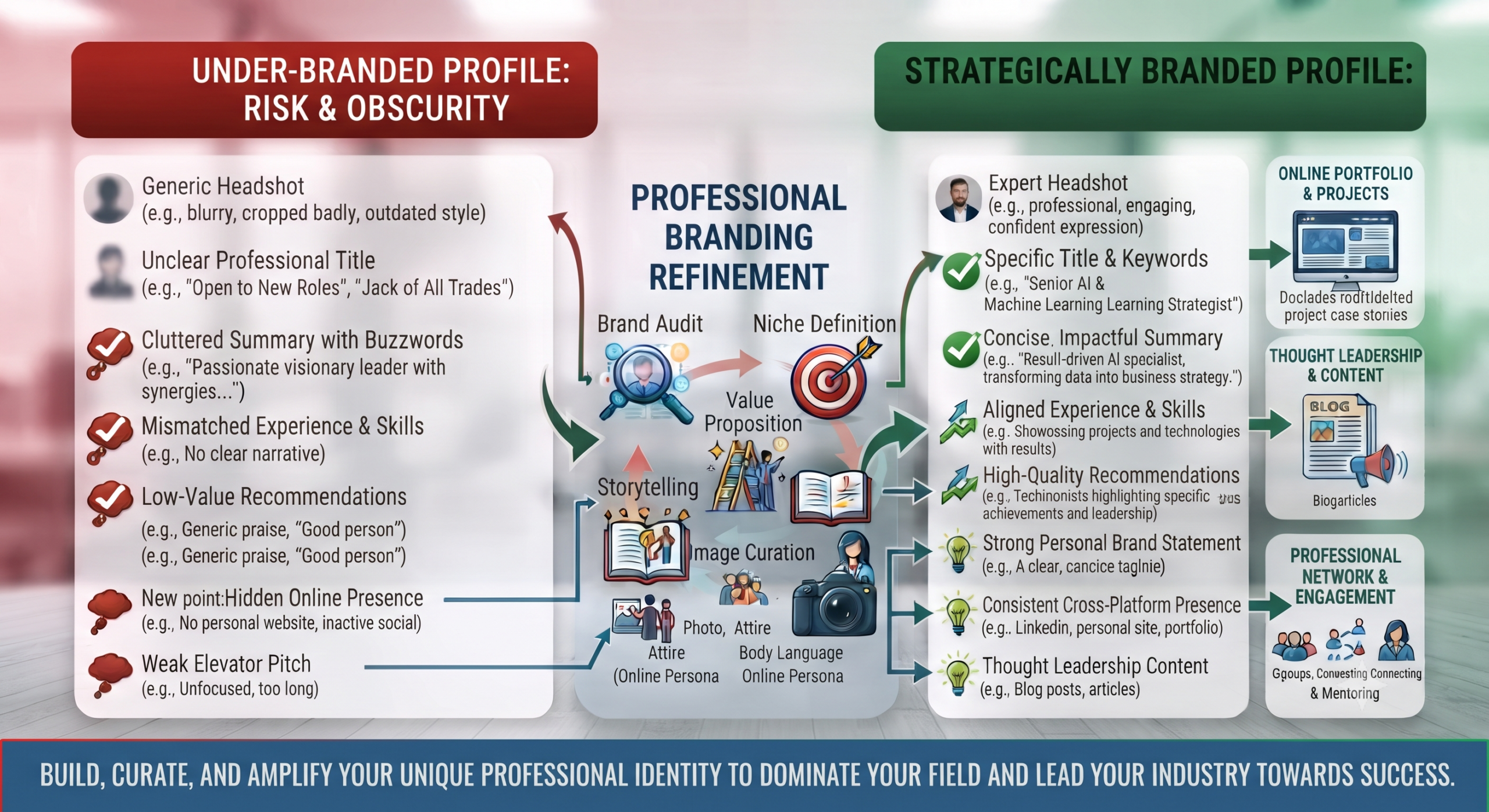
Your LinkedIn profile is likely underperforming. No, seriously, it’s. Most people treat it like a dusty old resume they uploaded five years ago, tossed a couple of skills on, and then hoped for the best. Big mistake. That’s like having a Porsche in the garage but riding a scooter to work. Your profile could be a magnet for opportunities, but without the right fuel—aka LinkedIn Profile Keywords—it’s just chilling there, invisible to the world.
And honestly, in this noisy online professional space? Invisible profiles get you nowhere. Zero new jobs. Zero new clients. Zero cool connections.
Here’s the thing: Keywords aren’t just some SEO geek’s obsession for Google. They’re the absolute engine of your digital professional presence on LinkedIn. We’re talking about real growth hacks here, not just vague advice. You want to show up in recruiter searches? Attract dream clients? Become a thought leader people actually listen to? It all starts with knowing which keywords to use and where to drop them.
This guide isn’t about fancy jargon. It’s about getting real. We’ll dig into how LinkedIn’s systems *actually* work, tap into smart AI tools (yeah, you heard that right), and lay out a strategic playbook that’ll have your profile pulling in new opportunities like a pro. This isn’t just about getting seen; it’s about seeing measurable impact.
Why LinkedIn Profile Keywords Aren’t Just Buzzwords—They’re Your Digital Resume’s Engine
Let’s just be blunt: if your profile ain’t showing up in searches, it may as well not exist. Period. Think about it. Recruiters aren’t just scrolling aimlessly; they’re *searching*. And they’re using specific words.
Real talk for a second.
The LinkedIn Algorithm: How it Ranks and Filters Profiles
This isn’t rocket science, but it’s not simple either. LinkedIn’s algorithm is smart, and it’s built to match people to opportunities based on relevance. It looks at your profile for keywords across different sections, not just your job title. How discoverable your profile is directly depends on how relevant and frequently you use those terms. It’s the difference between showing up, or getting lost. According to data, LinkedIn’s Recruiter platform uses over 30 search filters, and keywords? They’re paramount.
The Recruiter’s Lens: Understanding Search Behavior
Ever wonder what’s going on in a recruiter’s head when they hit search? They’re under pressure, often scanning hundreds of profiles. They might glance at a resume for 6 seconds, but they’ll *definitely* spend longer on your LinkedIn profile if it pops up in their keyword-driven searches. They’re looking for specific terms, sure. But they’re also looking for skills, experiences, and a strong professional narrative that makes sense. It’s not just about matching. It’s about convincing them your profile fits the bill.
Beyond ATS: Connecting with Your Ideal Audience (Clients, Network, Mentors)
Look, job hunting is huge on LinkedIn, we get it. But keywords do so much more than just get you hired. For freelancers, consultants, even B2B founders, they’re total magnets. Eighty percent of B2B leads from social media? They’re coming from LinkedIn. Think about it. Strategic keywords can pull in not just recruiters, but also potential clients looking for your specific service, collaborators searching for your unique skills, or industry leaders hoping to connect with expertise like yours. It’s not just about job titles; it’s about establishing your brand.
Deconstructing Your Professional Identity: How to Find Keywords for Your LinkedIn Profile
Okay, so we agree keywords are mission-critical. But how the heck do you find the *right* ones? No, you’re not just guessing.
Self-Assessment: Identifying Your Core Competencies & Aspirations
First, take a solid look in the mirror. What are you legit good at? What do you *want* to be known for? List your core skills, your expertise, your industry. Don’t just list “marketing.” Is it “digital marketing,” “performance marketing,” “B2B SaaS marketing”? Get specific. And where do you want to go next? Those future goals should absolutely shape your keyword strategy.
I’ve tested this myself.
Competitor & Industry Analysis: Learning from the Best (and the Rest)
This is simple spying, but it’s totally legal and smart. Go look at profiles of people who have the job you want, or are where you want to be. Check out industry leaders. So what words do they use in their headlines, summaries, and experience sections? Write ’em down. You’ll start to see patterns. What terms are popular? What sets them apart?
Deciphering Job Descriptions: The “Hidden” Keywords Employers Use
Here’s a serious growth hack: the job descriptions for roles you want are treasure troves. Employers practically hand you the keywords they’re searching for. Scan job postings – actively. What skills, technologies, and responsibilities keep showing up? Those are the exact words recruiters will plug into their LinkedIn search bar. Make a list. These are your gold.
Using AI Tools (AICreatify) for Advanced Keyword Discovery
Alright, ready for the real secret sauce? Forget manual guesswork. This is where AI tools become your absolute best friend. Seriously. You wouldn’t build a house with just a hammer anymore, would you?
This is how it works: Grab 3-5 target job descriptions you’re eyeing, or even profiles of people crushing it in your field. Paste them into an AI tool like AICreatify. The tool then gets to work, analyzing the text for frequency, semantic relevance, and even emerging trends you might miss. It’s like having a keyword research assistant on steroids.
(Alt-text: AICreatify interface showing keyword suggestions for LinkedIn profiles, based on input job descriptions and competitor analysis.)
Practical Execution Step: Go on, try it. You’ll get this super-smart output. Analyze it. See which skills are mentioned most often, what specific job titles are popping up, and any industry terms that seem hot right now. AICreatify can even uncover variations and related LSI (Latent Semantic Indexing) terms that you might not have thought of on your own. It’s a game changer for real keyword discovery.
Strategic Placement: Where to Integrate the Best Keywords for LinkedIn Profile Success
Knowing your keywords is just half the battle. Sticking them where they actually matter? That’s the art. You’re not just throwing them onto a page; you’re building a narrative.
The Magnetic Headline: Crafting Keyword-Rich Impact
This is your prime real estate. Think of it as your billboard. Don’t just slap your job title here, even if it’s legit. Go further. A smart format: “Job Title | Key Skill 1 | Key Skill 2 | Value Proposition.” For instance, instead of just “Senior Product Manager,” try “Senior Product Manager | AI/ML | SaaS Growth | Driving Innovation & User Engagement.” See how those keywords light it up?
The Persuasive “About” Section (Summary): Should I Use Keywords in My LinkedIn Summary?
Oh, absolutely yes. But naturally. This isn’t a dump yard. This is your story. You need to weave keywords into a compelling narrative that tells *your* professional story. Start strong, explain your passion, highlight your achievements, and then, yeah, drop in those keywords. But keep it human. Aim for a keyword density of around 1-2% for your core terms. That’s enough for the algorithm to notice, but not so much that you sound like a robot. Write for humans first, improve for machines second. Always.
Experience Section: Beyond Job Titles – Accomplishments & Responsibilities
Don’t just list responsibilities. Turn them into achievements, packed with keywords. Re-evaluate every bullet point in each role description. Instead of “Managed projects,” could it be “Led Agile Scrum projects, improving delivery efficiency by 15% across Q3 and Q4″? See the difference? That’s value, and it’s keyword-rich.
The Skills & Endorsements Section: Maximizing LinkedIn Skills Section Keywords
This section is pure keyword power. Don’t sleep on it. You can list up to 50 skills! Pick relevant, popular ones. And here’s the kicker: *actively seek endorsements.* Ask colleagues, former managers, even clients to endorse you for specific skills. When a recruiter filters by “Python for Data Science,” you want to be at the top of that list, backed by plenty of endorsements. Shoot for 50+ relevant skills, and make sure your top 10 are the absolute most impactful ones for your career goals.
Education, Licenses, Certifications, and Volunteer Experience: Don’t Overlook These Nooks
Every section counts. If your certifications (like a “PMP” or “Google Analytics Certified“) involve key terms, make sure they’re there. If you volunteered for an organization doing “digital strategy,” include that. These small corners add up, signaling to LinkedIn’s algorithm (and human readers) a fuller picture of your capabilities.
Publications & Projects: Showcasing Expertise with Targeted Keywords
Got a blog post you wrote? A project you led? A presentation? Get it on your profile! Not only does it show off your work, but you can use targeted keywords in the titles and descriptions of these items. “Published article on B2B content marketing strategies for SaaS startups” is way better than just “Article.”
Avoiding the “Keyword Stuffing” Trap: LinkedIn Keyword Strategy for Natural Engagement
Look, throwing a million keywords into your profile isn’t smart. It makes you sound clunky and spammy. And honestly, it works against you. The algorithm is smarter than that, and humans hate it.
Quality Over Quantity: The Fine Line Between Improvement and Spam
This isn’t 2005. Don’t just list “Marketing Marketing Marketing” over and over. Focus on *relevance* and *naturalness*. You’re aiming for authentic integration. One well-placed, powerful keyword is always better than ten awkwardly shoved-in ones.
Readability & Flow: Writing for Humans, Improving for Machines
Here’s the trick: Write for the human reading your profile first. Does it make sense? Is it engaging? Does it flow well? *Then* double-check that you’ve got your keywords in there. If it sounds unnatural to a human, it’s probably not doing you any favors with the algorithm either.
The “Buzzword” Blacklist: What to Avoid
Seriously, ditch terms like “guru” or “ninja” unless you’re genuinely in some super specific niche where that’s the legit term. These often just come across as amateurish or try-hard. Focus on concrete skills and achievements. Words like “smart,” “results-driven,” “self-starter” – they’re so overused, they’ve lost all meaning. Show, don’t just tell.
Growth Hacker Playbook: Real-World Examples of LinkedIn Keyword Dominance
Okay, enough theory. Let’s look at people who actually walk the talk, who’ve used these principles to get real results.
Example 1: Elena Vasileva – The B2B SaaS Founder Scaling Lead Generation
Brand/Growth Hacker: Elena Vasileva, CEO of a growing HRTech SaaS platform.
Concept Used: Tapping into personal profile keywords to boost her company’s message and pull in B2B leads—not just for hiring.
Execution: Elena knew her target HR leaders in SMBs were looking for solutions like “employee engagement platforms” or “onboarding automation.” So, she embedded these key terms everywhere: her headline (“Driving Employee Engagement & Retention with AI-Powered HR Tech”). About section, even her “Featured” content (linking directly to product demos, explicitly titled with those target keywords). She consistently posted content using these words, cementing her status as an expert.
Results & Data: Within half a year, her profile’s “Search Appearances” shot up by 210% month-over-month. Even better? This translated into a 35% increase in direct inquiries to her company’s sales team via LinkedIn. Her connection acceptance rate from target profiles also jumped from 18% to a whopping 45% because her value prop was so clear. That’s a direct ROI for a personal brand keyword strategy.
Example 2: Alex “The Disruptor” Chen – Niche Consultant’s Hyper-Targeted Approach
Brand/Growth Hacker: Alex Chen, a freelance Web3 Marketing Consultant. Specializes in NFT project launches.
Concept Used: Pinpointing deep niche keywords for fast market penetration and getting clients in a crazy competitive new space.
Execution: Alex didn’t just stop at “Web3 Marketing.” He went granular, using AICreatify to find hyper-specific, trending terms like “NFT Launch Strategy,” “Discord Community Management,” “Tokenomics Marketing,” “DeFi User Acquisition.” These weren’t just words; they were his business. He integrated these into every single possible spot on his profile—including custom titles for his “Experience” entries (e.g., “Led Marketing for [NFT Project X] – Grew Discord by 50K Members with Web3 Community Strategy“). Then, he used these very same keywords in his LinkedIn content and even his direct outreach messages.
Results & Data: In just four months, Alex hit top-of-search-results ranking for “NFT Launch Strategy” in his target area. His cold InMail campaigns to VCs and founders in Web3 saw an average CTR of 12% on his profile link, and a conversion rate of 8% to discovery calls. That’s *way* above average for cold outreach. His yearly income grew by an insane 150%, all directly tied to his hyper-improved LinkedIn presence.
Example 3: Salesforce Talent Acquisition – Employer Branding through Keyword Alignment
Brand/Growth Hacker: Salesforce’s Talent Acquisition team.
Concept Used: Making sure company pages and recruiter profiles matched what candidates were searching for, to build their employer brand and attract even passive talent.
Execution: Salesforce constantly figured out what their most-wanted roles were (think “Cloud Solutions Architect,” “SaaS Sales Executive,” “AI/ML Engineer“). Their TA team then made sure company page descriptions, career site links on LinkedIn, and even individual recruiter profiles were all improved with these precise keywords. Recruiters got training to include them in their personal summaries and ‘Interests’ sections. Plus, they pushed out blog content and employee spotlights using these same keywords, driving folks straight back to their career pages.
Results & Data: This whole-picture strategy sliced their time-to-hire by 25% for critical roles because candidates simply found them faster. Their LinkedIn job posts, specifically tuned with keywords, enjoyed a 30% higher apply-to-view ratio than generic ones. And get this: their ‘Employer Brand Index’ on LinkedIn shot up by 15%, meaning more engagement and a much better perception from talent.
Real-world Use Case: How a Data Analyst Boosted Profile Views by 180% with Strategic Keywords
Let me tell you about Mark. He’s a super smart senior Data Analyst, totally impressive, but his LinkedIn? Crickets. It was just… generic.
- Before: Mark had keywords like “data analysis,” “reporting.” Sounds fine, right? Nope. Low visibility (avg. 50 search appearances/week), hardly any recruiter messages (maybe 1-2 InMails/month), zero interview invites. Frustrating, right?
- Action: So, Mark got smart. He used AICreatify. He punched in job descriptions for the Principal Data Analyst roles he wanted. The tool spit out high-impact, specific keywords: “Python for Data Science,” “SQL Improvement,” “Predictive Modeling,” “Tableau Dashboarding,” “ETL Processes,” “Big Data Architectures.” Mark then went to town, weaving these into his headline, summary, experience bullet points, skills, even the titles of his “Featured” projects.
- After (with data): Within just three months, Mark’s profile views jumped by an astounding 180% (from 50 to over 140 per week). Recruiter InMails? Up by 150% (from 1-2 to 5-6 a month). His profile’s click-through rate from search results improved from 1.5% to 4.2%. He landed 5 relevant interviews, and eventually snatched up a principal analyst role with a sweet 20% salary increase. The ROI on his time? Absolutely massive. This is what focused keyword strategy does.
(Alt-text: Hypothetical graph showing an upward trend of weekly LinkedIn profile views and monthly recruiter InMail volume for “Mark” after set uping strategic keywords, spanning a 3-month period.)
Campaign Playbook: Launching a Targeted LinkedIn Lead Generation Effort for “Strategic Sarah”
Okay, let’s switch gears. Say “Strategic Sarah” isn’t looking for a job anymore. She’s a B2B consultant, and she needs new clients. Like, yesterday. Here’s her exact playbook:
Step 1: Define Your Campaign Goal & Hyper-Target Audience
Goal: Sarah wants 3 new high-value clients for her “AI-driven Marketing Strategy” consulting in the next 60 days. Clear, right?
Audience: Marketing Directors and VPs at mid-sized SaaS companies ($10-50M ARR) in North America. This is so precise.
Practical Execution: Sarah’s gotta pinpoint their pain points. What keeps *them* up at night? What solutions are they hunting for? This detail is what makes keyword selection spot on.
Step 2: AI-Powered Keyword Discovery & Profile Audit (Weeks 1-2)
Action: Sarah gets into AICreatify. She feeds it competitor consultant profiles, her target clients’ job descriptions (e.g., “VP Marketing SaaS”), and relevant industry reports. She’s looking for “problem-solution” keywords here. Think “Customer Churn Reduction,” “Marketing ROI Improvement,” “SaaS Growth Playbooks.”
Action: Before she does anything else, she audits her current profile. What are her “Search Appearances,” “Profile Views,” and “InMail Response Rate” *now*? She notes it all down. This is her baseline.
(Alt-text: AICreatify dashboard showing a prioritized list of suggested keywords for a LinkedIn profile, with relevance scores and suggested placement locations across the profile.)
Step 3: Profile Improvement & Content Strategy Alignment (Weeks 2-3)
Action: Sarah revamps her headline: “Marketing Director | AI-Driven Growth Strategies for SaaS | Customer Acquisition & Retention Expert.” She’s owning it.
Action: She rewrites her “About” section. Naturally integrating 5-7 core keywords, but always focusing on the value she brings to her target audience. It’s a story, remember?
Action: Updates past experience descriptions. Every achievement is now framed with client-centric keywords. No more generic stuff.
Action: Curates her “Featured” section with enticing lead magnets. Think “Case Study: 30% ARR Growth with AI Marketing,” titled with those problem-solution keywords.
Action: Drafts her first three killer LinkedIn posts for the next month. Each post anchors around a core keyword. “The Future of SaaS Customer Acquisition with AI,” or “Demystifying Marketing ROI Improvement.” And hashtags? You bet she uses relevant ones. Need help finding those trending, on-point hashtags? Try AICreatify’s Hashtag Generator. It’s seriously good.
Step 4: Targeted Outreach & Engagement (Weeks 3-8)
Action: Sarah uses LinkedIn Sales Navigator (or just smart advanced search) to find 100 dream ICPs.
Action: Sends *personalized* connection requests. No sales pitches! She references shared interests, content she liked, something that signals genuine connection. And yeah, she subtly acknowledges relevant keywords on *their* profile to show she did her homework.
Action: Actively engages with her ICPs’ content. Likes, yes, but insightful comments. This boosts her visibility and authority.
Action: Publishes weekly content, as planned in Step 3. Ensuring those keywords keep appearing naturally, delivering value to her target audience. You know, like this post!
Action: Tracks her connection acceptance rates and initial engagement. She aims for a solid 25%+ connection acceptance rate from targeted folks.
Want to make those connections even easier? Think about what hooks people into engaging with your content on LinkedIn. AICreatify’s LinkedIn Hooks Generator can give you some killer starting points for your posts.
Step 5: Measurement, Iteration & Scale (Ongoing)
Action: Sarah checks LinkedIn Analytics every single week. “Search Appearances,” “Profile Views,” “Post Impressions,” “Engagement Rate,” and crucially, her “InMail Response Rate.”
Action: Tracks every direct inquiry and, eventually, every discovery call conversion. She’s shooting for a 10-15% InMail response rate – that’s what a well-improved profile gets.
Action: A/B tests headlines or the first paragraph of her ‘About’ section for even higher engagement. Always be testing!
Action: Based on what keywords bring the most “Search Appearances,” she adjusts. If “Customer Retention Strategies” gets heaps of views, she creates more content around it.
Action: Scales her successful outreach tactics to new ICP segments. This loop? It’s what gives you continuous improvement and maximum ROI. Think of it as your own personal growth loop.
Beyond Job Seeking: Keywords for Thought Leadership, Networking, and Lead Generation
We’ve talked jobs, we’ve talked clients. But keywords are bigger than just that. Your profile isn’t just a resume; it’s your brand’s home base.
Attracting Industry Peers: Building Your Expert Persona
You want other smart people in your field to find you? To see you as someone worth connecting with? Then use the language of your industry. Don’t dumb it down. Integrate those specialized terms that fellow experts recognize and respect. This builds your expert persona.
Driving Inbound Leads: Keywords for Freelancers & Consultants
For you, your profile *is* your lead generation tool. Potential clients are absolutely searching for solutions. They’re not looking for “Marketer.” They’re looking for “Conversion Rate Improvement Specialist” or “Google Ads Expert for eCommerce.” Be specific, be visible.
Content Strategy: How Keywords Inform Your LinkedIn Posts
Your personal content? It’s another powerful keyword delivery mechanism. Use your keyword research to find what topics are trending and what questions people are asking in your niche. Use those as anchors for your LinkedIn articles, your everyday posts, even your video descriptions. That way, your content has a better chance of popping up, drawing people to your perfectly improved profile. Oh, and if you’re ever stuck for content ideas, check out AICreatify’s Instagram Caption Generator (even though it says Instagram, the principles of catchy, keyword-friendly copy apply everywhere!).
Measuring Your Impact: How Many Keywords Should I Use on LinkedIn & How to Track Performance?
You wouldn’t just launch a campaign and never look at the results, right? Your LinkedIn profile is no different.
Stick with me here.
LinkedIn Analytics: What Metrics Matter Most
Your LinkedIn Dashboard holds the keys. Look at:
- “Search Appearances”: This is the big one. Who’s finding you, and for what keywords?
- “Profile Views”: How many people are actually landing on your profile?
- “Post Impressions” & “Engagement Rate”: If you’re posting, is it getting seen and interacted with?
- “InMail Response Rate” & “Connection Acceptance Rate”: These are your conversion metrics!
Recruiter InMail Volume: The Ultimate Indicator
Honestly, seeing that jump in relevant InMails from recruiters or potential clients? That’s your ultimate proof. A properly improved profile can easily snag you a 2-3x increase in InMail volume from people who *actually* matter. That’s not a guess; that’s experience talking.
Iteration is Key: Continuously Refining Your Keyword Strategy
This isn’t a one-and-done deal. The market changes. Your career goals change. Your profile should, too. Schedule a monthly “LinkedIn Keyword Health Check.” Run AICreatify again. Compare what worked last month with new trends. Update your headline, tweak your summary, add new skills. Think of it as continuous SEO for your personal brand.
Frequently Asked Questions
What are good keywords for LinkedIn?
Good keywords are highly specific to your skills, industry, experience, and career goals. They include specialized job titles, technical skills (e.g., Python, SQL, Salesforce CRM), industry terms (e.g., SaaS, FinTech, Healthcare IT), desired responsibilities (e.g., “Project Management,” “Data Analysis”), and certifications (e.g., PMP, CPA). The best keywords are often found by analyzing job descriptions for roles you want and looking at competitor profiles.
How do I find keywords for my LinkedIn profile?
Start by performing a self-assessment of your core skills and aspirations. Then, analyze job descriptions for your target roles to see what terms employers are consistently using. Look at the profiles of successful professionals in your field to identify common keywords. Tools like AICreatify can also analyze these inputs and suggest high-impact keywords, including LSI terms.
Should I use keywords in my LinkedIn summary?
Absolutely, yes, but naturally. Your “About” section (summary) is a prime location to weave keywords into a compelling narrative. Aim for a 1-2% keyword density for your core terms, ensuring the text flows well and tells your story in an engaging, human way. It’s about blending improvement with readability.
How many keywords should I use on LinkedIn?
There isn’t a magic number, but focus on quality over quantity. Aim for 5-10 core, high-impact keywords that represent your professional identity. Then, sprinkle a broader array of 30-50 related skills and LSI terms across your entire profile (headline, about, experience, skills section, projects). The goal is natural integration, not stuffing.
Do keywords matter on LinkedIn?
Yes, unequivocally. Keywords are critical. They determine whether your profile shows up in recruiter searches, attracts potential clients, or gets noticed by industry peers. They fuel LinkedIn’s algorithm, helping it match your profile with relevant opportunities and search queries. Without strategic keywords, your profile is largely invisible, regardless of your experience.
Conclusion
So, there you’ve it. Keywords? They’re your secret weapon. They take your LinkedIn profile from “just there” to a bona fide growth engine. You’re not just hoping for opportunities; you’re actively orchestrating them.
With smart AI tools like AICreatify helping you scout those perfect terms, thoughtful, strategic placement across your profile, and a commitment to measuring and tweaking what you’re doing—you’re not just improving. You’re setting yourself up to dominate.
Don’t just exist on LinkedIn; dominate it. Start improving your LinkedIn profile with AICreatify today and turn search appearances into real-world opportunities!
About Author
Susha Kanaujia
Product Manager and AI enthusiast with 16+ years of experience in technology and digital products.
Is Your LinkedIn Profile Holding You Back?
Get an instant AI audit of your headline, About section, and keywords. Discover exactly what recruiters see and get 1-click Before & After rewrites to rank higher in searches.
+42% Recruiter Views predicted if you fix 3 keyword gaps.
🚀 Enjoying AICreatify?
We'd love your support on Product Hunt. ❤️ Upvote us and share your feedback.